Custom JupyterLab
Is it now possible to install your custom JupyterLab.
Note
It's supported at barnard only now..
Disclaimer
Warning
Please note that our technicias will not mantain your own JupyterLab installation.
Please understand that JupyterLab is a complex software system of which we are not the developers and don't have any downstream support contracts for, so we merely offer an installation of it and will not provide additional support.
Start a new JupyterLab session at: JupyterHub as described at: start session
Installation on JupyterHub
Create a new notebook using the Python3 (ipykernel) kernel.
Include at the cells the following commands:
install_script = ! which install_home_jlab.sh
result = ! {install_script[0]}
%run {result[0]}
After execute the kernel you will see the following:
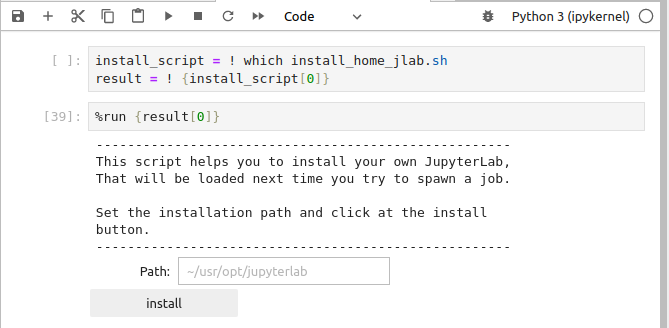
Follow the instructions displayed for continue to the installation, the click the install button.
At end you will see the resume of yours installation:
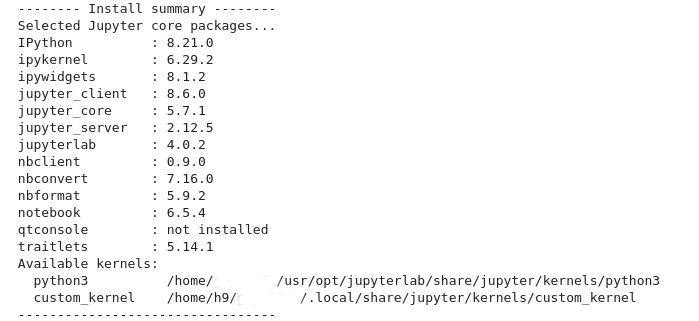
This is all, next time you spawn a session at JupyterHub you will use your own JupyterLab.
Note
For using the system installation please remove/rename the folder ~/usr/opt/jupyterlab.
Custom JupyterLab with Open OnDemand
In Open OnDemand, one can choose the 'Container environment' option under 'Jupyter Environments'
and specify a Singularity image.
Open OnDemand will then attempt to launch jupyter lab from inside that container.
This allows the user to prepare their own JupyterLab environment.
More information about Singularity and how to build images can be found
at Containers.
Backlinks
No other pages link to this page.